
CU Profiles Quick Start Guide
CU Profiles gives your team free, peer-based benchmarking built on NCUA data. This guide gets you up and running in under 5 minutes.
As part of Callahan & Associates’ democratizing data initiative, CU Profiles enables you to quickly assess performance, identify potential risks, and evaluate how growth aligns with your strategic priorities. Powered by Callahan’s Peer Suite benchmarking platform, it is designed for efficient, high‑value review by executives and management teams.
In this quick start guide, you will learn how to:
- Confirm who you are benchmarking against
- Navigate core CU Profiles reports
- Answer high‑level performance & growth questions using the Performance Dashboard
- Share insights with leadership and board members
Set Up Your Comparison Set
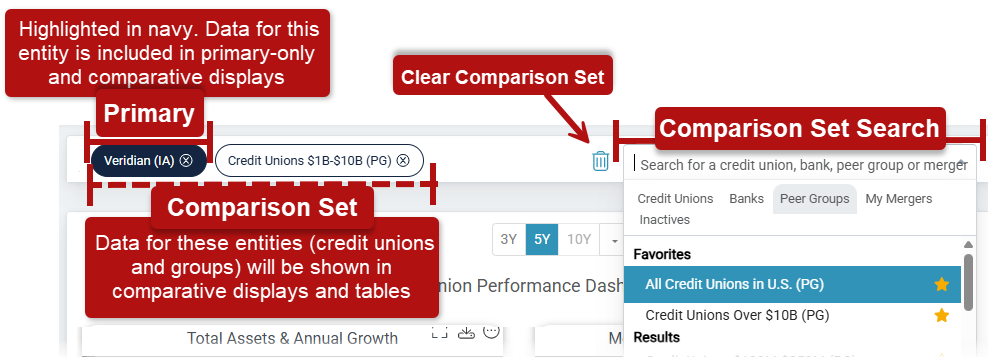
Your default comparison set is ready to go, so you can jump straight into analysis. Review what's included below or skip ahead.
Your Default Comparison Set
When you log in for the first time, your comparison set includes:
Your Credit Union (Primary)
- Your credit union is set as the Primary institution and is highlighted in navy. This is based on your most recent NCUA 5300 data. The Primary institution is the focus of single‑institution views, such as the Credit Union Profile and portfolio charts.
Asset‑Based Peer Group
- An asset‑based peer group, also based on your most recent 5300 data, is automatically included. This provides immediate peer context without any setup.
- This default configuration is designed to work for most users and allows you to start reviewing performance right away.
Want More Control?
You can adjust your comparison set at any time:
- Add or remove individual credit unions
- Swap asset-based peer groups
- Adjust your Primary and set temporary primaries to focus on peers other than your credit union
Peer Pointer!
CU Profiles includes:
- Peer Suite’s 11 built‑in asset‑based peer groups
- The NCUA’s 6 standard asset‑based peer groups
- All active credit unions
With a Peer Suite subscription, you can also:
- Add banks for competitive analysis
- Create strategic or geographic peer groups
- Model hypothetical mergers
- Include inactive institutions for historical context
Reach out to your Callahan Advisor to learn more.
Explore Built‑In Analysis
CU Profiles includes two core types of built‑in content designed to help credit union leaders quickly understand performance and support confident decision‑making.
Use the left‑hand navigation to access reports and the Credit Union Performance Dashboards at any time.
CU Profile Reports
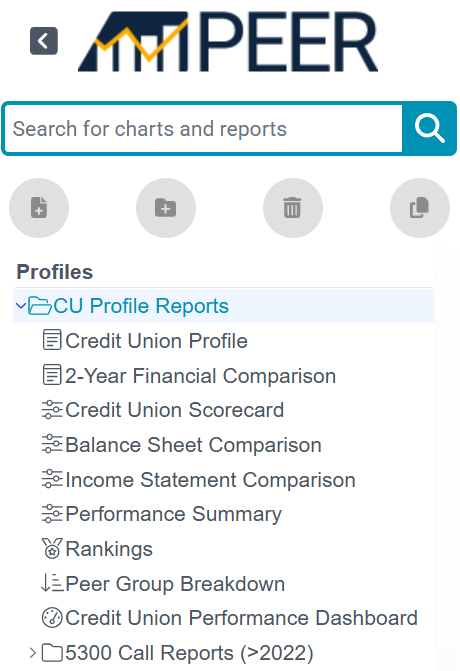
Credit Union Profile
A high‑level snapshot of key financial and operational metrics for your credit union.
- Quickly understand overall performance and footprint
- Scroll down to explore the Branch and ATM map highlights, presence, overlap, and expansion opportunities
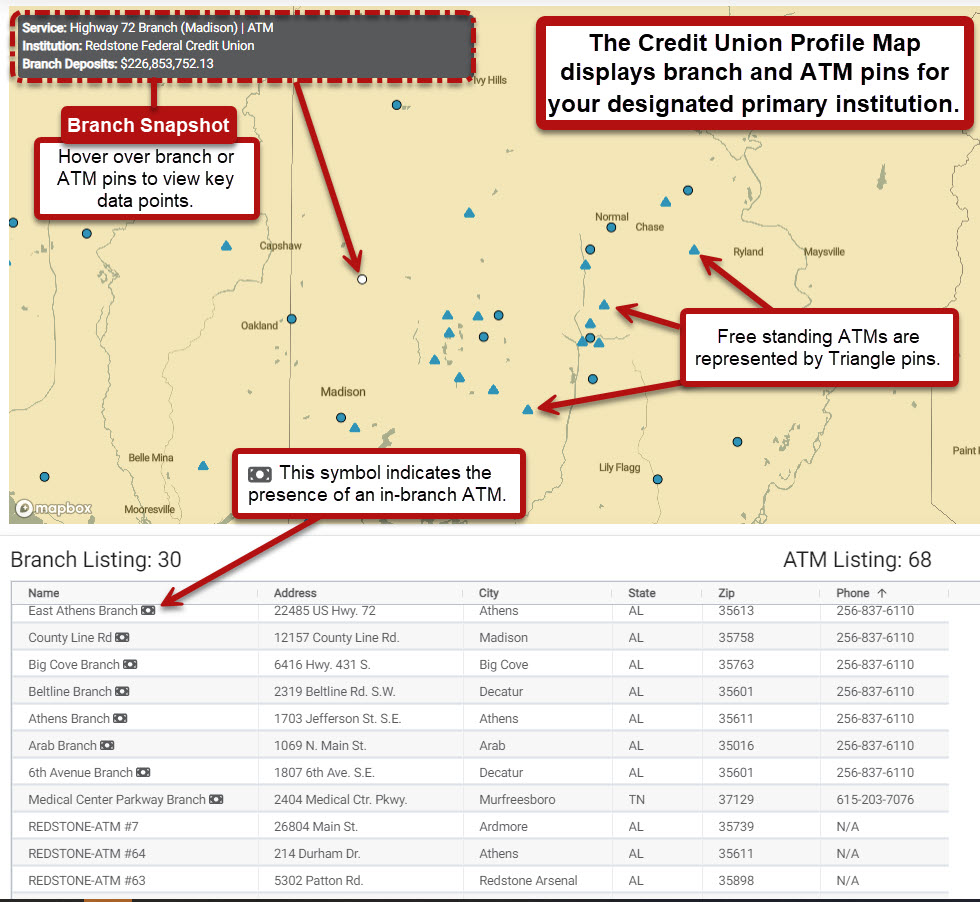
Peer Pointer!
Updates to your executive team and vendor relationships can be made by reaching out to your Callahan Advisor or emailing VerifiedData@callahan.com.
2-Year Financial Comparison
A side‑by‑side view of balance sheet and income statement trends.
- Assess whether performance is improving, slowing, or diverging from peers
- Useful for year‑over‑year reviews and leadership conversations
Credit Union Scorecard
A comprehensive view of performance across approximately 100 ratios.
- Covers lending, efficiency, earnings, and member engagement
- Helps identify strengths and areas that may need attention relative to peers
5300 Call Reports(>2022)
Access standardized Call Report templates for deeper reference.
- View data for individual credit unions or peer group aggregates
- Available by schedule or in full, depending on your needs
Use the Performance Dashboard to Answer Key Questions
Use this dashboard to:
- Evaluate whether asset and membership growth are healthy and sustainable
- Compare profitability and earnings strength to peers
- Identify emerging risks through loan mix and delinquency trends
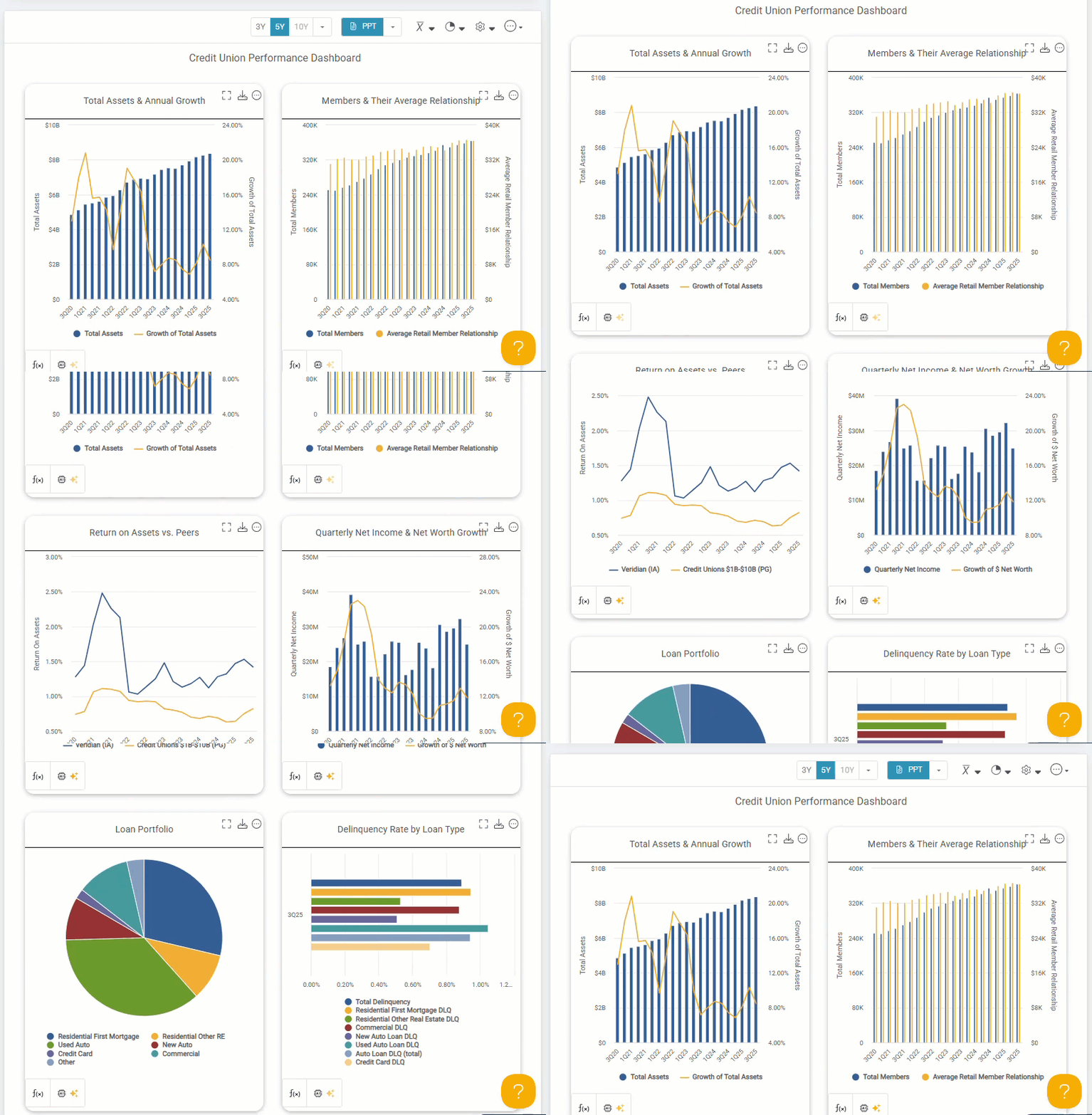
Learn how to use the Credit Union Performance Dashboard to answer key questions in this dedicated guide.
Peer Pointer!
Share Your Findings
Download Reports
- Download directly from the top‑right corner using the blue dropdown to select your preferred export type.

Note: Additional download options are available with subscription access.
Automate Reporting

From the More Options menu, select Email to schedule quarterly delivery aligned with NCUA data releases.
This is ideal for:
- Ongoing leadership updates
- Quarterly board reporting
- Regular performance check‑ins tied to official data updates
Want a step-by-step guide? Explore this How-To on how to send and schedule automated reports.
Next Steps
Log in or register with your credit union email address to begin exploring your performance. Share insights with your leadership team and use CU Profiles to support more focused, data‑driven discussions.